 EquipLoop
What is an Asset Management System?
What is an asset management system? It connects people, processes, asset records and software to manage equipment throughout its lifecycle.
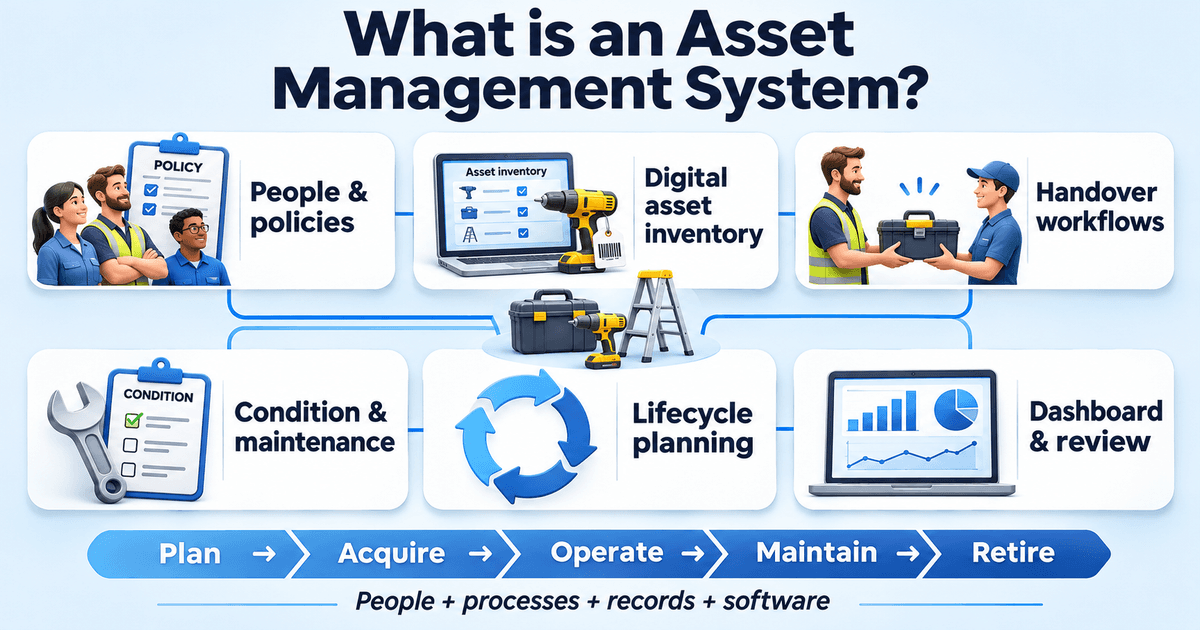
What is an asset management system? It is the connected set of people, policies, processes, records and tools an organisation uses to get value from its assets throughout their lifecycle. For equipment, that means knowing what you have, who is responsible for it, its condition and when to maintain, replace or retire it.
A laptop list answers “What do we own?” A working system also explains what happens when someone receives a laptop, returns it damaged or leaves the business. It connects the record to a decision and gives someone responsibility for the next action.
This guide focuses on physical business assets, using EquipLoop's equipment records and handovers as a practical example. Investment management, which deals with portfolios such as shares and bonds, serves a different purpose.
The system is bigger than the software
Asset management software holds information and supports workflows. The management system also includes your objectives, responsibilities and operating rules. NAMS Canada explains this distinction: people, processes and information systems work together to achieve asset management objectives.
Consider a shared drill. You might have software that stores its serial number, but you also need to decide who may issue it, how its condition is checked and who handles a damaged return. Those decisions make the software useful.
For the broader discipline, see our guide to what asset management means. Here, the focus is how to put that discipline into practice.
What is an asset management system made of?
A practical equipment management system needs six connected parts. This is an explanatory model for business equipment, rather than a prescribed list of ISO requirements.
1. People, policies and objectives
Decide what the business needs its assets to achieve. An office might need every new employee to have working equipment on their first day. A contractor might need tools available for each scheduled job.
Then assign responsibility. Who creates records? Who approves purchases? Who checks returns? Who decides whether damaged equipment can be used again? A short, followed policy is more useful than a detailed document nobody owns.
2. A digital asset inventory
Your digital asset inventory is the shared record of the equipment in scope. For individually tracked items, useful fields include a unique asset ID, description, serial number, recorded location, responsible person, status and condition.
An asset ID identifies the specific item. “Cordless drill” describes a type of equipment; “DRL-014” identifies one particular drill. Keeping those separate helps when two identical items go to different people.
If you are building that inventory for the first time, our equipment register setup guide includes sample columns and a starter CSV.
An online inventory of physical equipment also differs from digital asset management, which usually concerns files such as photographs, videos and brand materials.
3. Identification and handover workflows
A QR code or barcode connects a physical item to its record. The workflow captures the event: an issue, return, transfer or correction.
In EquipLoop, QR code asset tracking helps an authorised user open the equipment record and work with its assignment, condition and history. A QR label does not transmit a live location. The recorded location and holder depend on the updates your team makes.
The record should make the handover understandable later, including who received the item and when it is expected back.
Our guide to equipment management in practice shows how EquipLoop separates the equipment model, physical unit, status and condition, and what happens when an individual item is returned damaged.
4. Condition, maintenance and asset integrity
Condition tells you whether equipment is fit for the next task. Maintenance addresses the work needed to keep it serviceable or restore it. Asset integrity concerns whether an asset can perform its intended function safely and reliably.
These are related, but a condition note is not an engineering inspection or a completed repair. A damaged cable might require the item to be taken out of circulation and referred to a competent person before further use.
EquipLoop supports equipment condition records and maintenance status. If you need recurring service schedules, technician work orders or predictive maintenance, assess a dedicated maintenance management system or EAM solution for those requirements.
5. Lifecycle planning and decisions
The asset lifecycle, also written as “life cycle”, starts before purchase and continues through use, maintenance and retirement. Lifecycle planning asks whether to buy, repair, redeploy or replace an item, considering its service, cost and risk.
The cheapest purchase may create more work later if it is hard to maintain or unsuitable for the job. Your management lifecycle should therefore connect operational experience to future purchasing decisions.
6. A dashboard and review process
A dashboard helps turn records into a queue of decisions. Useful questions include which equipment is overdue, what is damaged and which items remain available.
EquipLoop's operational dashboard brings together equipment status, condition, recent activity and items needing attention. Managers still need to investigate exceptions and act on them. A dashboard cannot correct an unrecorded handover.
A practical example using EquipLoop
Imagine a South African installation business that shares drills, testing equipment and laptops between employees. This is an illustrative workflow, not a customer case study.
| Event | What the team records or does | Why it matters |
|---|---|---|
| Add a drill | Create an equipment record with an asset tag, serial number, location and starting condition | Similar drills can be distinguished |
| Label it | Attach a QR label linked to the record | The physical item can be identified at handover |
| Issue it | Assign the drill to a person and record the expected return | Responsibility and timing are clear |
| Receive it back | Record the return, condition and notes | The next user does not have to reconstruct what happened |
| Find damage | Update the record and route the item through the business's inspection or repair procedure | A recorded problem has an owner and next action |
| Review its future | Use its condition and history alongside repair quotes, costs and operational needs | The manager has evidence for a repair or replacement decision |
EquipLoop supplies the equipment record and custody workflow. The business supplies the policy, checks and decisions around it. Together, they form part of an asset management system.
For equipment moving between crews, our guide to knowing who has your construction equipment explains how to record the person, site, accessories and each handover through to return.
That distinction matters when comparing products. Tracking a laptop's holder does not automatically manage its software licences. Recording a drill as being in maintenance does not automatically schedule a technician.
What are the five stages of asset management?
One useful five-stage model is plan, acquire, operate, maintain and retire. Organisations group these activities differently; maintenance also runs alongside operation.
| Stage | Main question | Example |
|---|---|---|
| Plan | What service do we need, and what assets will deliver it? | Decide how many working laptops the team needs |
| Acquire | What should we buy, lease or redeploy? | Check available equipment before ordering another laptop |
| Operate | How will the item be used and accounted for? | Register, label, assign and record transfers |
| Maintain | What will keep it suitable for use? | Inspect condition and arrange servicing or repairs |
| Retire | When and how should it leave service? | Authorise replacement, update its status and complete the appropriate disposal process |
The stages are useful because they prevent the register from becoming only a purchasing list. Information from use and maintenance should influence what you acquire next.
How EAM, CMMS, ITAM, SAM and DAM differ
“Asset management system” describes a broad approach. Software categories support different parts of that approach, and their capabilities overlap.
| Category | Main focus | Typical requirement |
|---|---|---|
| Equipment tracking software | Identified equipment, custody, returns, recorded locations and condition | Know who has each laptop or tool; this is EquipLoop's core focus |
| Enterprise asset management, or EAM | Enterprise assets across their lifecycle, including operations and maintenance | Coordinate equipment, maintenance resources and lifecycle decisions across sites |
| Computerised maintenance management system, or CMMS | Maintenance execution | Schedule preventive work, manage work orders and record repairs |
| IT asset management, or ITAM | Technology assets, including hardware and software | Manage an organisation's technology estate |
| Software asset management, or SAM | Software rights, deployments and obligations | Understand licence use, renewals and compliance exposure |
| Digital asset management, or DAM | Digital content and media | Organise approved images, videos, documents and usage rights |
| Investment management systems | Financial portfolios | Support investment administration and portfolio decisions |
IBM's EAM overview distinguishes the broader lifecycle scope of EAM software from the maintenance focus of CMMS. Its SAM guidance covers software lifecycle obligations, while its DAM explanation concerns managing digital files.
Choose according to the work you need to complete. A larger feature list is useful only when those features address your actual requirements.
For a comparison of spreadsheets, QR code software and location devices, see our cheap asset tracking guide. It helps separate the cost of maintaining equipment records from the cost of automatic location reporting.
Where ISO 55000 and the South African guide fit
ISO 55000:2024 explains asset management vocabulary, overview and principles. ISO 55001:2024 specifies requirements for an asset management system. This management framework concerns organisational practices as well as information tools. Buying software alone does not establish conformity or certification.
The South African Department of Higher Education and Training's Annexure 4: Guideline on asset management systems for infrastructure, revised in January 2021, offers a useful local reference. Section 3.1 groups infrastructure asset management into six areas: the register, policy and service levels, condition assessment, service life planning, critical infrastructure needs and delivery process inputs.
The document addresses university infrastructure. For a business managing movable equipment, the transferable lesson is to connect records to responsibilities, condition, risk and planning. Its infrastructure guidance should not be treated as a universal compliance checklist for every small business.
For example, a register may show that a drill exists. A condition check establishes whether it can be issued. A service requirement explains why a working drill must be available tomorrow. A replacement decision connects those facts to the budget.
How to start a useful system
Start with one equipment group and one complete workflow:
- Set the objective. Choose a concrete question, such as “Who has each company laptop?”
- Define responsibility. Name the people who maintain records, issue equipment and check returns.
- Build the initial register. Give each tracked item a unique ID and capture the details your team needs.
- Agree on handover rules. Decide when the record must be updated and how condition is checked.
- Test exceptions. Try a late return, a damaged item and a transfer between people.
- Review and improve. Check whether a second authorised user can understand each item's position from the record.
If your immediate need is equipment accountability, explore EquipLoop's equipment management software and try a few real records. If your main need is maintenance scheduling or software licence control, include those requirements explicitly when evaluating tools.
Common questions
What is the main purpose of asset management?
The purpose is to obtain useful value from assets while balancing the performance you need with their costs and risks. For business equipment, that means having suitable items available, clear responsibility and informed maintenance and replacement decisions. Our guide to the purpose and objectives of asset management explains how those goals differ for physical equipment and financial assets.
What falls under asset management?
It can include planning, acquisition, identification, assignment, operation, condition checks, maintenance, risk review and retirement. The scope depends on the assets involved. A fleet, an equipment pool and a software estate need different records and specialist processes.
What are the three main asset management types?
There is no single universal three-type classification. A useful broad grouping is physical assets, financial assets and intangible assets. Software categories such as EAM, ITAM and DAM describe more specific management needs and do not map neatly onto only three types.
Which tool is used for asset management?
A spreadsheet can support a small register. Equipment tracking software supports shared records and handovers; CMMS supports maintenance; EAM supports broader operational asset management; and SAM tools address software obligations. Choose the tool around the workflow and the information you need.
What is the best basic asset management software?
The best fit depends on what you track and how it moves. For shared laptops and tools, prioritise unique records, simple issue and return steps, condition, history and usable reporting. EquipLoop is an option for that equipment workflow. Test it with your own items and check the current plan features before choosing.
References and further reading
The example and equipment workflow above were written for this guide. The following sources provide the wider management context and alternative software perspectives:
- DHET: Annexure 4, Guideline on asset management systems for infrastructure, revised January 2021. See sections 2.1, 2.2 and 3.1 to 3.5.
- NAMS Canada: What is an asset management system?, for the relationship between people, processes and information systems.
- ISO 55000:2024 and ISO 55001:2024, for principles and management system requirements respectively.
- Accruent: What is an asset management system?, for an operational software and maintenance perspective.
- CASM: What is an asset management system?, for a fixed-equipment tracking perspective.
- IBM: Enterprise asset management, software asset management guidance and digital asset management, for the specialist categories discussed above.
PUT IT INTO PRACTICE
Give every piece of equipment a clear record.
Track who has it, where it is and what happened to it. Start your asset register with EquipLoop.
Start tracking for free