 EquipLoop
1. List what is expected
Use the equipment issue record to identify every item, asset ID and accessory assigned to the employee. Include missing items so they stay on the return record.
Create an equipment return form that shows what came back, its condition and what is still outstanding. Download the free equipment return form template, or add employee details, equipment and accessories to generate a ready-to-sign PDF.
Create your record
Use one form per employee or borrower. Start with your expected equipment list, record received items and keep exceptions open for follow-up.
Use the equipment issue record to identify every item, asset ID and accessory assigned to the employee. Include missing items so they stay on the return record.
Confirm each physical item and serial number. Record its actual return date, condition and missing accessories. Add a follow-up note for damage or anything still outstanding.
Download the PDF and review it together. Sign the acknowledgement, file the record and update the equipment register or workspace separately.
Issuing equipment first? Create a free equipment handover form. For an ongoing list of issues and returns, use the equipment issue register Excel template.
An equipment return form is a dated record of company equipment received back from an employee, contractor or borrower. It connects each physical item to the person returning it, the receiver and its observed condition. It also keeps missing property and accessories visible until someone follows up.
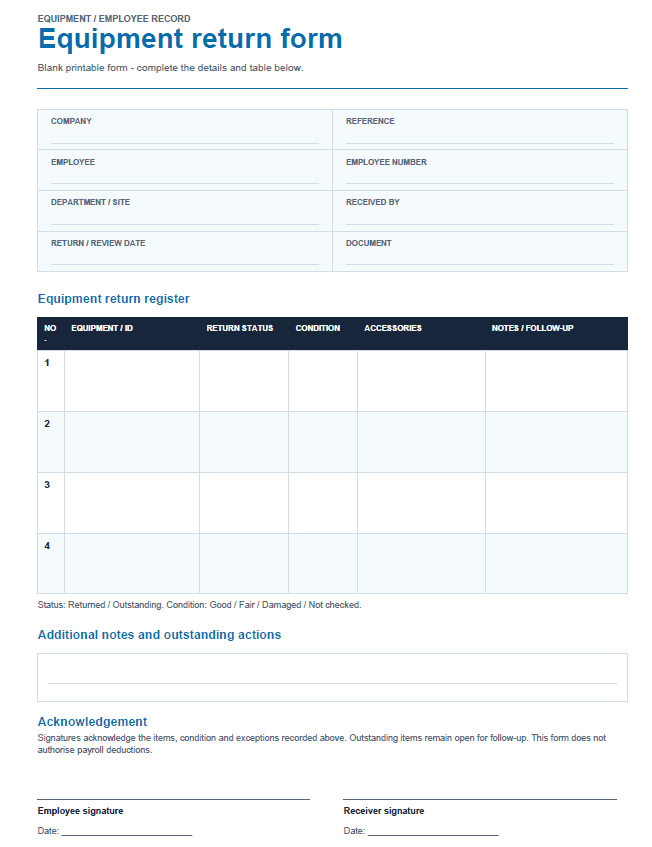
Use the free equipment return form template for a printed return meeting, an employee leaving the business or the end of a project. The blank A4 PDF has four equipment rows, space for notes and two signature lines. If you need more rows or want to type the details first, the online generator creates a completed PDF and adds pages as needed.
The template is a printable PDF, rather than an interactive PDF with fillable fields. Complete the blank version by hand, or enter the information in the equipment return form generator before downloading.
Download the free blank PDF templateA useful return record identifies the people and the property, then records the result for every expected item. Start with the original equipment list so an item that never arrives is still recorded as outstanding.
| Field | What to record | Why it matters |
|---|---|---|
| Company and reference | Business name and a unique return reference, if used. | Connects the document to the correct business and handover record. |
| Employee or borrower | Name, employee number where applicable, and department or site. | Identifies whose equipment list you are checking. |
| Equipment identity | Item name, asset ID and serial number where available. | Distinguishes one laptop, drill or radio from another of the same model. |
| Return status and date | Returned or Outstanding, plus the actual date received for returned items. | Separates expected property from property physically received. |
| Condition | Good, Fair, Damaged or Not checked, with specific observations. | Makes the condition at receipt clear without assuming an inspection happened. |
| Parts and accessories | What was expected with the item and exactly what is missing. | Keeps a missing charger, battery or detachable part open for follow-up. |
| Receiver and actions | Who received the item, the next action and the person responsible for it. | Gives outstanding items or damage an owner and a next step. |
| Acknowledgement | Employee and receiver signatures and their signing dates. | Confirms the recorded handover, including any listed exceptions. |
In this generator, an empty actual return date uses the return / review date at the top of the form. Enter a separate date when an item came back earlier. Leave an unreceived item marked Outstanding.
A company property return form brings the employee's assigned items together for a return handover. Company property can include laptops, phones, tools, radios, keys, access cards and reusable equipment. List property still with the employee as well as items brought to the meeting.
Before the handover, compare the expected list with the original issue record. During the meeting, match asset IDs and serial numbers, check accessories and record condition. Afterwards, give each outstanding item an action owner and agreed follow-up date in the notes, then update your current equipment records.
Use the equipment handover form when issuing property to someone. Keep ongoing allocations and returns in the equipment issue register. These records connect the outgoing handover to the eventual return.
An equipment checkout form records equipment going out to a borrower: who takes it, the item identity, issue date, expected return date and condition at checkout. A company equipment release form may also record permission to take equipment off site, the purpose and the person approving its release. Check which meaning your organisation uses.
The return form completes the receiving side of that workflow. Compare it with the checkout or release record to confirm the same item and accessories came back. Keep the original issue date and approval on the outgoing record, and the actual return date and received condition on this form.
For an outgoing equipment record, start with the free handover form generator. For a shared issue-and-return log, use the equipment checkout register template. This return generator records receipt; it does not approve an equipment release.
An acknowledgement receipt form records that a named person received the property described in it. For an equipment return, the acknowledgement should identify the employee or borrower, the receiving person, the items received, the date and any exceptions. Both people should review the same item list before signing.
If a laptop comes back without its charger, record the laptop as Returned, identify the charger as missing and leave that exception visible beside the acknowledgement. A signature should acknowledge the actual record, rather than imply that every expected item was received.
The generated PDF includes employee and receiver signature lines with dates for later signing. It does not capture an electronic signature or record payment. File the signed copy alongside the original handover or issue record.
Equipment may be returned with detachable parts and accessories such as chargers, batteries, cables, carry cases, guards or attachments. Record what should accompany the item before checking what is actually present. For identical parts, include the expected and received quantities in the notes.
Give a separately tracked attachment its own equipment row and asset ID. Use condition notes for visible damage or a reported fault. The form records these observations; it does not determine whether equipment is safe to put back into use.
A rental equipment return form records equipment received back at the end of a hire. Check the returned unit against the rental agreement, including its serial number, attachments, keys and other included accessories. Record the actual received date, condition and the person accepting the return.
For a basic rental return record, enter the person returning the equipment in the generator's Employee field, use the rental agreement number as the Reference and add the receiving staff member. On the blank template, label the person as the hirer or their representative. Where relevant, put the return time, meter or hour reading, fuel level and cleaning observations in the notes. Keep expected and received accessory quantities explicit.
Use the rental provider's required documents alongside this record. This PDF does not calculate hire charges, settle a deposit or replace the rental agreement. Any inspection or charge decision should be recorded separately by the responsible person.
A parts return record identifies components being received back into a store or sent to a supplier. Useful details include the part number, description, quantity, related order or invoice, reason for return, observed condition and the receiving person. A wrong part, an unused spare and a faulty component need different explanations.
For an internal return of individually identified parts, use a row for each part and add quantities and the reason in its notes. The generator has no dedicated quantity or supplier-claim fields, so use your stock register or supplier's form when you need stock adjustments, purchase-order line items or credit processing.
When returning parts to a supplier, check their return instructions and keep their authorisation reference with your dispatch and receipt records. Recording a part on this form does not establish that the supplier has accepted it.
A return authorization form requests or records a supplier's approval to send goods back, often under a return merchandise authorization (RMA) reference. The equipment return form on this page records physical receipt of company property from an employee or borrower. Approval to send an item and confirmation that it was received are separate steps.
If a supplier requires return authorisation, use their process to provide the order or invoice number, part or serial number, quantity, return reason and any requested evidence. Record the approved reference and follow their packaging and delivery instructions before dispatching the goods.
This generator can keep an internal receipt record and a supplied reference. It does not issue an RMA number, approve a supplier return or promise a refund. Once company equipment is physically returned, use the equipment return form to record what was received and what still needs attention.
An equipment return form records company property received back from an employee or borrower. It identifies each item, its condition, the actual return date, accessories and anything still outstanding, with acknowledgement by the employee and receiver.
Yes. Add the employee and their expected equipment list, then record what has actually come back. It works for laptops, phones, tools, radios, keys and other company property, including equipment returned during offboarding.
Mark the laptop as Returned and list the charger under Missing accessories. The PDF keeps the missing accessory visible and flags follow-up. Returning the main item does not close an accessory gap.
Keep an item Outstanding until you receive it. For received equipment, choose Good, Fair or Damaged and add condition notes. Damaged items and returned items whose condition has not been checked are flagged for review.
Yes. Choose Download blank printable form for an A4 PDF with four blank equipment rows, notes and signature lines. You do not need to fill in the generator first. For more items, complete the generator and the table will continue onto additional pages as needed.
The PDF is generated in your browser. The form details and logo are not uploaded or saved by this tool. They are cleared when you reload or leave the page. Download the form before leaving. Optional analytics, if accepted, record tool events and item counts without the entered details.
The free generator adds signature lines for later signing; it does not capture an electronic signature or change a workspace record. Record the return in your equipment register or EquipLoop workspace separately so your current assignments stay accurate.
Keep equipment assignments, condition and return history together in EquipLoop. Use the free form for a return today, or create a workspace for shared equipment records.